
Task Management Template | Airtable + Zite
Projects, tasks, subtasks, comments, and team visibility. Built on Airtable. Explore it free or get it adapted to your workflow.
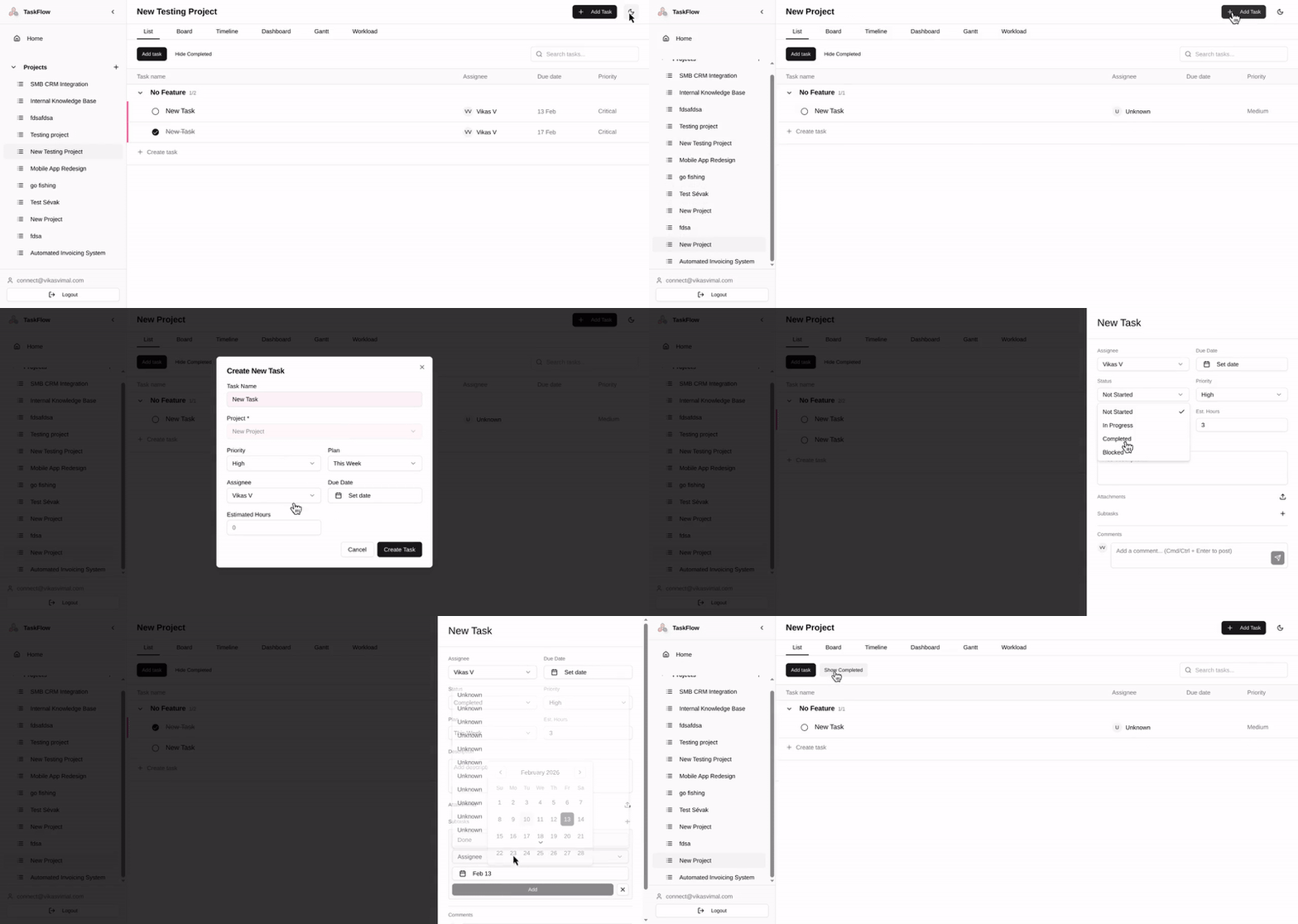
This is a task management system built with Airtable and Zite. You can explore the interface, review the Blueprint, and inspect the Airtable base behind it.
Inside the template, you can try the app, review the Blueprint, and open the Airtable backend.
Most teams do not have a task-management problem in the abstract. The problem is usually that the structure behind the work is too loose, too hidden, or too dependent on the habits of a few people. Tasks get created, but ownership is unclear. Status fields stop meaning much. Comments live in one place, decisions in another, and reporting becomes a manual exercise.
This template is useful as a reference point for that kind of situation. It shows one way to structure projects, tasks, subtasks, comments, and team views in a system that stays inspectable.
What you can look at
The app shows the day-to-day interface a team would use. You can create projects, add tasks, break work into subtasks, leave comments, search, filter, and move around the system as a user.
The Blueprint shows the thinking behind the build. It covers the users, the main features, the flows, and the structure of the system. For anyone comparing options or reviewing a proposal, this is often the most useful part because it shows how the system was scoped, not just how it looks.
The backend is the Airtable base itself. You can inspect the tables, fields, and relationships that make the app work. That matters because many tools only expose the interface. If you are trying to judge how adaptable a system will be later, the underlying structure matters at least as much as the front end.
Why this may be useful
Some people will land here because they are looking for a task-management template. Others will be trying to work out whether a custom Airtable-based system could replace part of their current setup. Some will arrive from a proposal and want to see a real example rather than a list of promises.
For all three cases, the point of this page is the same. It gives you something concrete to inspect.
It is not a claim that every team should replace Asana, Trello, or ClickUp. In many cases, off-the-shelf software is still the right answer. We wrote more about that in Build vs. Rent: When Off-the-Shelf Software Doesn’t Fit How You Work. The tradeoff usually becomes clearer when a team needs more than a shared task list and starts running into edge cases around approvals, reporting, client views, or workflow-specific logic.
This template sits in that gap. It is a working example of what a more adaptable system can look like when the structure is visible.
What is included in the template
The system includes a personal home view so each user can see their work across projects in one place. Tasks are grouped by time horizon, which makes it easier to see what needs attention now and what can wait.
Projects can be organised into sections or feature groups, and progress rolls up as work is completed. Tasks can have owners, due dates, priorities, and status values. Larger items can be split into subtasks with their own owners and dates.
Comments stay attached to the work rather than being scattered across Slack threads, email, or meeting notes. Search and filters make it easier to find active work without losing track of completed items. Team members can log in and see activity tied to their account. The app also supports light and dark mode.
None of this is especially novel on its own. What matters more is that the interface, the data model, and the scoping logic can all be reviewed together.
How this differs from a standard task app
A standard SaaS product usually asks you to fit your process into its structure. Sometimes that is completely fine. Sometimes it is not.
The mismatch tends to show up when the work involves more than tasks. A team may need approvals, client-facing views, linked project and billing data, resource planning, custom reporting, or automations built around specific operational steps. At that point, the issue is less about whether the task list looks good and more about whether the system underneath can carry the process without becoming brittle.
That is the main reason to look at a template like this. Not because it is a better universal task app, but because it shows what becomes possible when the structure is open to inspection and change.
For a related argument, You Don’t Need More Tools—You Need Better Systems gets at the same problem from a broader operations angle.
Who this is likely to be relevant for
This template will probably be most relevant to teams that have already tried a general-purpose task tool and found that the friction was not just about adoption. It is more useful when the underlying workflow has real complexity and that complexity keeps leaking outside the tool.
That may look like managers chasing updates by hand, task ownership getting lost between roles, spreadsheets being used to patch reporting gaps, or external collaborators needing visibility without being dropped into the internal system.
It may also be relevant if you are evaluating custom no-code builds more generally and want to see a real example of how a system can be scoped and structured. A Practical Approach to No-Code for Your Business is a useful companion if that is the question behind your search.
If you want to adapt something like this
You can treat the template as a reference and rebuild your own version. That is useful if you mainly want to understand the model and adapt it in your own stack.
If you want a version shaped around a real workflow, the better starting point is usually a Blueprint. That means mapping the process, deciding what needs to exist in the system, and being clear about what should stay simple. The goal is not to produce a large strategy document. It is to make the structure legible before build work starts.
We have written about that process in User Story Mapping for No-Coders and How to Price No-Code Proposals From Both Sides of the Table. Those pieces are more useful than a generic feature list if you are trying to work out how a project like this should be approached.
A note on Zite
Zite is a fast way to turn an Airtable-backed system into a usable app, especially when authentication and a cleaner front end matter. But the tool choice is only part of the picture. The harder work is usually in the structure, edge cases, permissions, flows, and decisions about what belongs in the system in the first place.
That is the point we made in Zite Is Fast. The Last 10% Is Still the Hard Part. This template is meant to make that split easier to see. You can look at the app, but you can also look at the planning and the backend.
Questions people often have
Can this replace Asana?
For some teams, yes. For others, no. It depends on whether the main problem is the task interface itself or the structure around the work.
Does it include Kanban?
Not in this version. This one is list-based.
Can time tracking be added?
Yes. The structure can support it, but it is not included out of the box here.
Can a whole team use it?
Yes, though Airtable and Zite plan limits still depend on how the final setup is configured.
Is this meant to be copied exactly?
Usually not. It is more useful as a reference implementation than as a claim that every team should use the same setup.
Where to start
Click Explore Template and start wherever your question is.
If you want to understand the user experience, open the app.
If you want to understand the scope and logic, start with the Blueprint.
If you want to see how the system is actually structured, open the Airtable base.